

Can I use my Gohub eSIM as a hotspot to share data with other devices?
It depends on your plan. Not all Gohub eSIM plans support hotspot (also known as Personal Hotspot or Mobile Hotspot). Before assuming this feature is available, check your plan's details first.
How to check if your plan supports hotspot
Open your plan page on the Gohub app or website → scroll to Technical Details → look for the Hotspot field.
- Yes - hotspot sharing is supported
- No - hotspot is not available on this plan
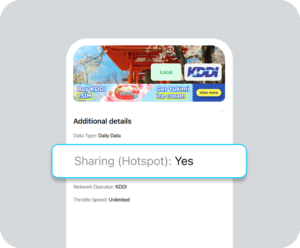
If your plan supports hotspot, here's how to enable it:
iOS
- Go to Settings → Personal Hotspot
- Toggle Allow Others to Join on
- Connect your other device via Wi-Fi, Bluetooth, or USB
Android
- Go to Settings → Connections → Mobile Hotspot and Tethering
- Tap Mobile Hotspot → toggle it on
- Connect your other device via Wi-Fi, Bluetooth, or USB
⚠️ Hotspot usage draws from your plan's data allowance. Heavy usage (streaming, downloads) on connected devices will consume your data significantly faster than normal.
📌 Not sure how much data you need for hotspot use? See How do I know how much data I need for my trip? for a full data estimation guide.