

How do I know how much data I need for my trip?
Data needs vary a lot depending on how you travel. A quick sightseeing trip with light map usage is very different from a week of remote work with video calls and hotspot sharing. Here's how to figure out the right amount before you buy.
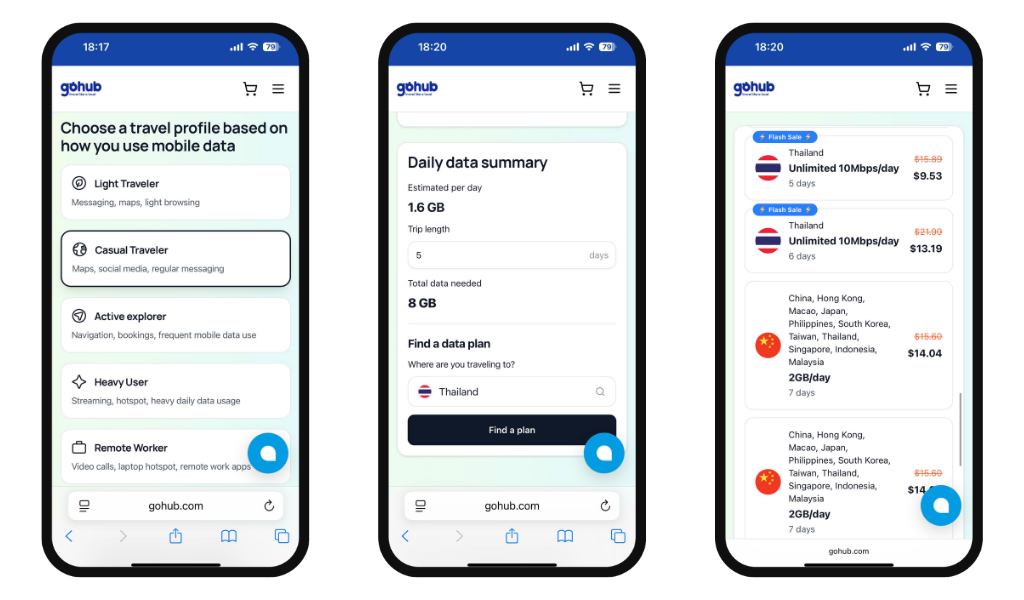
Step 1: Identify your travel profile
Start by thinking about how you typically use your phone on the go:
| Profile | Typical usage |
|---|---|
| Light Traveler | Messaging, maps, light browsing |
| Casual Traveler | Maps, social media, regular messaging |
| Active Explorer | Navigation, bookings, frequent mobile data use |
| Heavy User | Streaming, hotspot, heavy daily data usage |
| Remote Worker | Video calls, laptop hotspot, remote work apps |
Step 2: Estimate by activity
Here's how much data each activity consumes per day, depending on intensity:
| Activity | Low | Occasional | Frequent | Heavy |
|---|---|---|---|---|
| Social media | 200MB | 500MB | 1GB | 2GB |
| Music streaming | 150MB | 300MB | 600MB | 1GB |
| Video streaming | 300MB | 800MB | 1.5GB | 3GB |
| Navigation | 50MB | 150MB | 300MB | 500MB |
| Web browsing | 150MB | 400MB | 800MB | ~1.5GB |
| Emails & messaging | 50MB | 150MB | 300MB | 600MB |
| Video calls | 300MB | 800MB | 1.5GB | 3GB |
| Download/Update files | 200MB | 500MB | 1GB | 2GB |
Step 3: Use Gohub's Data Calculator
Not sure how to add it all up? Gohub's free Travel Data Calculator does it for you - select your travel profile, adjust each activity to match your habits, enter your trip length, and it will calculate exactly how much data you need.
Tip: Always add a 20-30% buffer on top of your estimate. Background app activity, software updates, and unexpected usage can eat into your data faster than expected.