

My eSIM has signal bars but I can't connect to the internet (iOS)
This is most likely an APN (Access Point Name) issue. APN is the setting that tells your phone how to connect to the carrier's data network - and each eSIM may require a different APN configuration.
Step 1 - Check your basic settings first
- Make sure Mobile Data is turned on: Settings → Mobile Service → Mobile Data
- Make sure Data Roaming is turned on: Settings → Mobile Service → tap your Gohub eSIM → Data Roaming
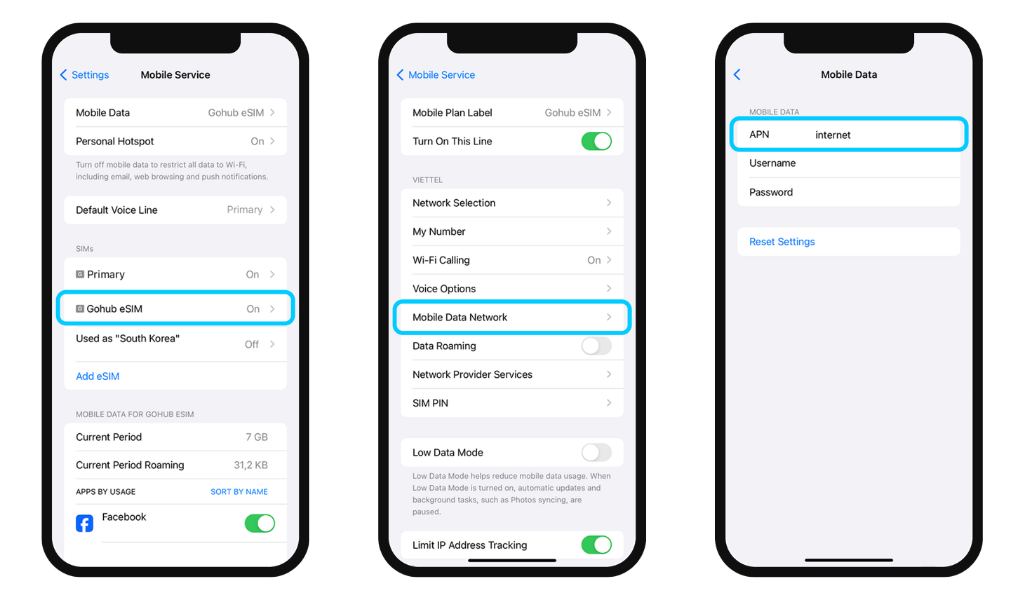
Step 2 - Check your APN settings Go to Settings → Mobile Service → tap your Gohub eSIM → Mobile Data Network. Check if the APN field is filled in correctly.
Each eSIM plan may have a different APN. Contact Gohub via WhatsApp to get the correct APN for your specific plan, then enter it in the field above.
Step 3 - Restart your device After updating your APN settings, restart your phone and check if the connection works.
If you're still unable to connect after these steps, contact Gohub via WhatsApp - our team can diagnose the issue on our end.