

My eSIM has signal bars but I can't connect to the internet (Android)
This is most likely an APN (Access Point Name) issue. The steps on Android are slightly different depending on your device brand.
Step 1 - Check your basic settings first
- Make sure Mobile Data is turned on: Settings → Connections → SIM Manager → tap your Gohub eSIM → enable Mobile Data
- Make sure Data Roaming is turned on: Settings → Connections → Mobile Networks → Data Roaming
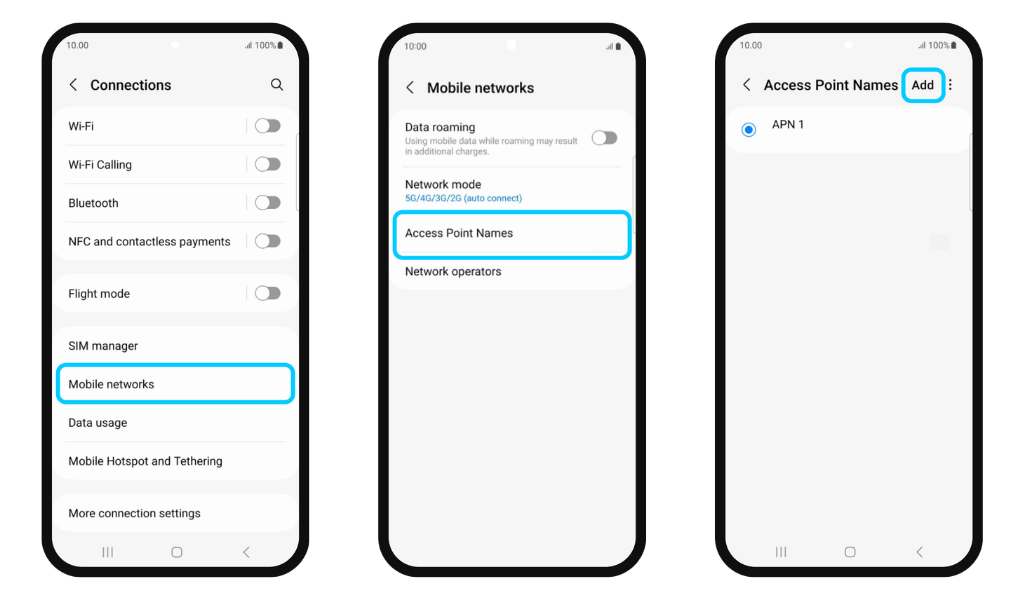
Step 2 - Check your APN settings Go to Settings → Connections → Mobile Networks → Access Point Names. Check if an APN is already configured for your Gohub eSIM.
Each eSIM plan may require a different APN. Contact Gohub via WhatsApp to get the correct APN for your specific plan, then tap Add and enter the information provided.
Step 3 - Restart your device After updating your APN settings, restart your phone and check if the connection works.
If you're still unable to connect, contact Gohub via WhatsApp - our team can diagnose the issue on our end.