

I can't delete my eSIM from my device. What should I do?
⚠️ Important warning before you proceed: Once an eSIM is deleted, it cannot be reinstalled - even on the same device. Gohub is unable to recover or reissue a deleted eSIM. Only delete your eSIM if you are completely done using it.
How to delete your eSIM:
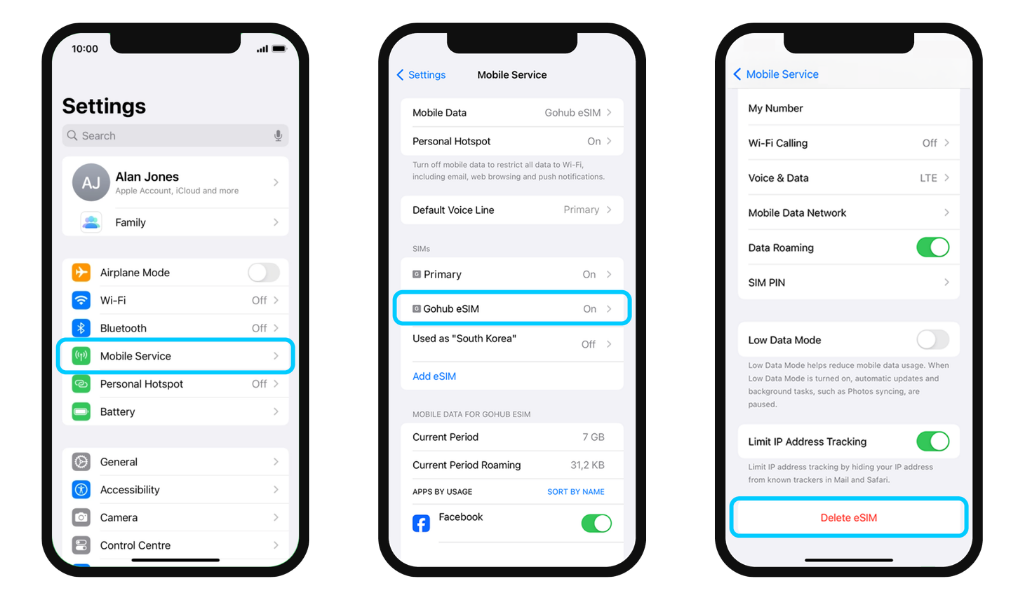
On iPhone:
- Go to Settings → Mobile Service
- Select the Gohub eSIM you want to remove
- Scroll down and tap Delete eSIM
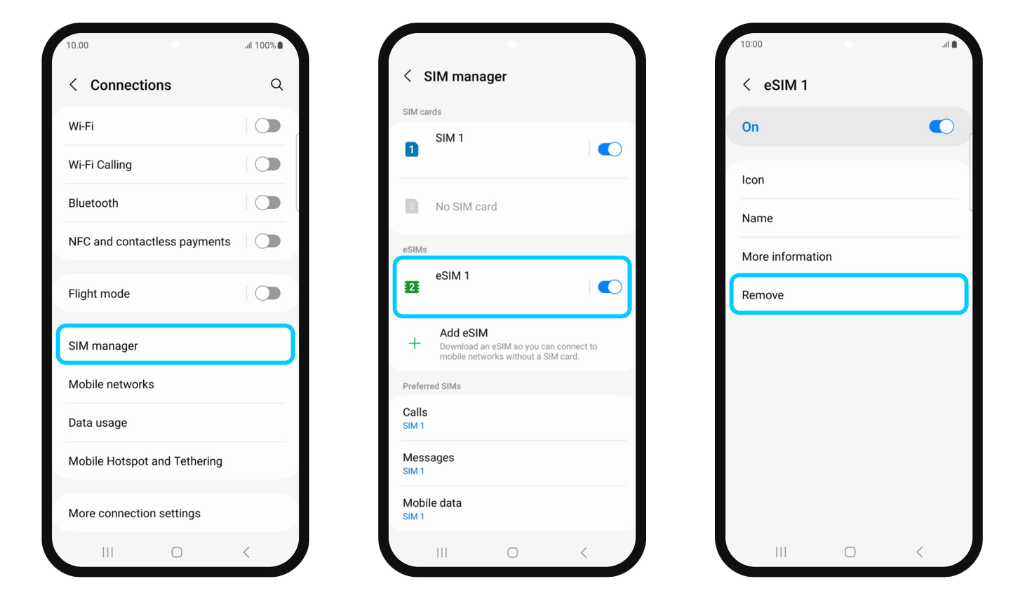
On Android:
- Go to Settings → Connections
- Tap SIM Manager
- Select the eSIM you want to remove
- Tap Remove
If the delete option is grayed out or not working:
- Restart your device and try again
- Make sure your device software is up to date
- Ensure you have a stable internet connection - some devices need network access to communicate with the carrier's server when removing an eSIM
If you still can't delete the eSIM after these steps, contact Gohub via WhatsApp.