

How do I set a data limit on my Android device?
Setting a data limit helps you avoid exceeding your eSIM's allowance - your phone will alert you when you're approaching the limit, and automatically turn off mobile data when you reach it.
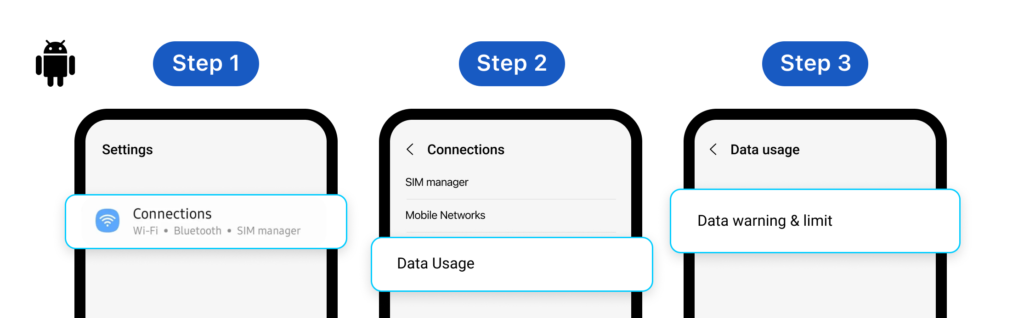
For Samsung Galaxy devices:
- Open Settings → Tap Connections
- Tap Data Usage
- Make sure Mobile Data is ON → Tap Billing Cycle and Data Warning
- Tap Start Billing Cycle → set the date based on your arrival in the destination country
- Enable Set Data Warning → enter your warning threshold (e.g. if your plan has 10 GB, set warning at 8 GB)
- Enable Set Data Limit → enter your limit in numbers (mobile data will turn off automatically when reached)
For Google Pixel devices:
- Open Settings → Tap Network & Internet
- Tap SIMs
- Make sure Mobile Data is ON → Tap Data Warning & Limit
- Tap Mobile Data Usage Cycle → set the date based on your arrival in the destination country
- Enable Set Data Warning → enter your warning threshold (e.g. if your plan has 10 GB, set warning at 8 GB)
- Enable Set Data Limit → enter your limit in numbers (mobile data will turn off automatically when reached)
Menu names and steps may vary slightly depending on your Android version and device manufacturer. If you can't find these settings, contact Gohub support via WhatsApp for assistance.
iOS does not support automatic data limits. To monitor your usage on iPhone, see How do I check how much data I've used?