

WhatsApp 24/7:+1 (302) 899-2888
Help and contact
Gohub Logo – Travel eSIM Provider
HomeAbout UsBuy eSIM
Login
Loading page, please wait...
Gohub Logo – Travel eSIM Provider
Download Gohub App on the App StoreApp StoreDownload Gohub App on the Google PlayGoogle Play

Popular Destinations

ThailandChinaVietnamJapanSouth KoreaTaiwanSingaporeMalaysia

Gohub

About UsCareersPartner with us

eSIM

How to install eSIMSupported DevicesData UsageCarrierEsim Travel GuideEsim News

Help

Help CenterUsing your eSIMTroubleshootingCompatible devicesFAQ

Follow Us

FacebookLinkedInInstagramTikTok
© 2026 Gohub. All rights reserved.
Privacy PolicyTerms of Service
Using your eSIM
  1. Help center
  2. /Using your eSIM
  3. /How do I know which eSIM is currently using data?

How do I know which eSIM is currently using data?

If you have multiple SIMs or eSIMs on your device, here's how to confirm which one is actively handling your mobile data.

For iOS
  1. Go to Settings → Mobile Service
  2. Make sure your Gohub eSIM is turned on
  3. Tap Mobile Data
  4. The eSIM with a checkmark is the one currently using mobile data
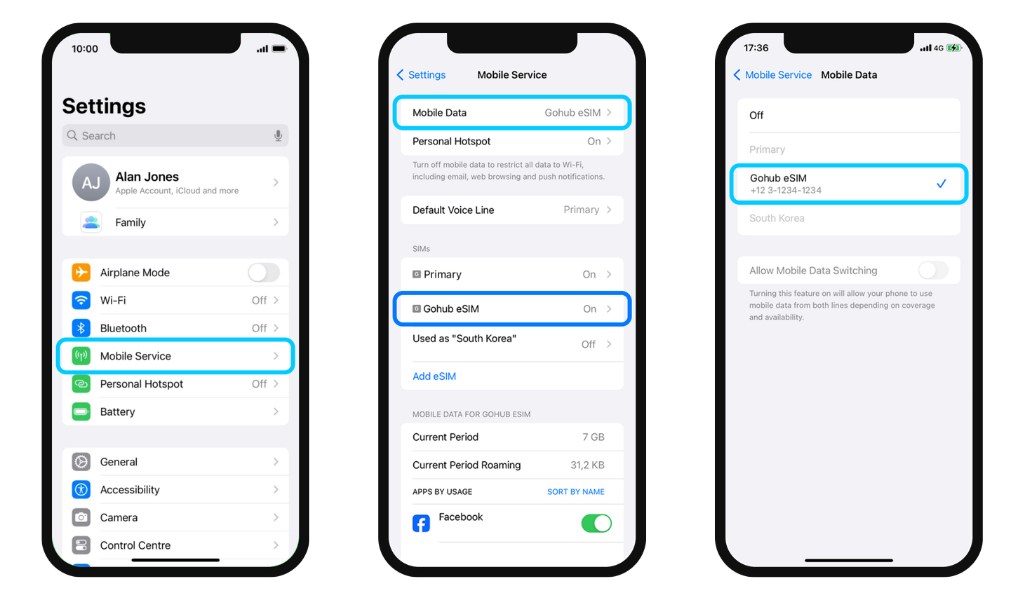
It's recommended to turn off Allow Mobile Data Switching to prevent your phone from automatically switching to your primary SIM's data without you knowing.

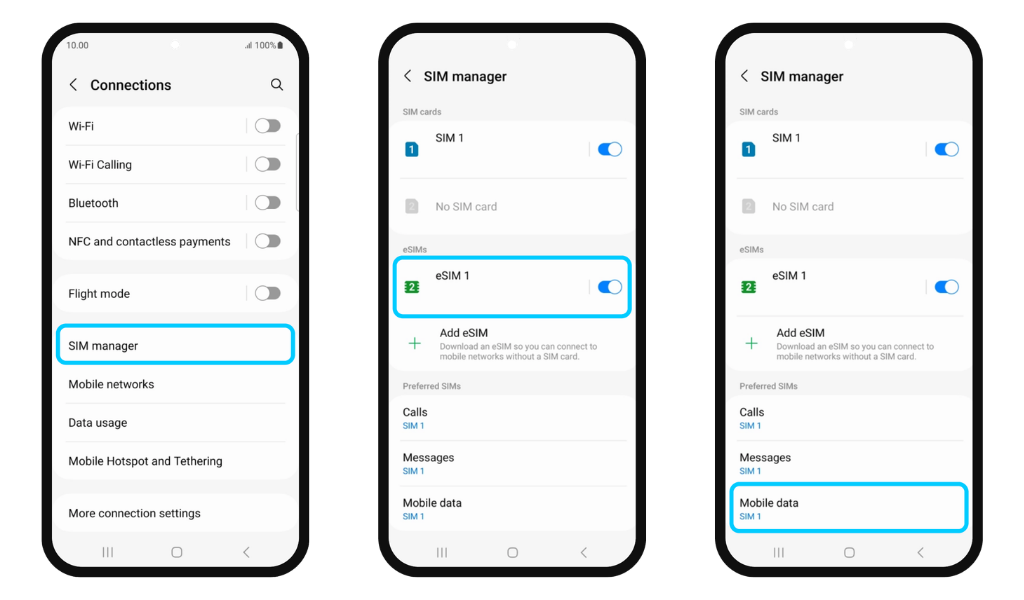
For Android
  1. Go to Settings → Connections
  2. Tap SIM Manager → make sure your Gohub eSIM is turned on
  3. Scroll down to Preferred SIMs
  4. Check which eSIM is currently selected under Mobile Data
Related guides

  • What do I need before installing my eSIM?
  • Can I install my eSIM before my trip?
  • How do I install my eSIM on iPhone?
  • How do I install my eSIM on Android?
  • My eSIM plan says "Special Activation Required" - What do I need to do?
  • My eSIM plan requires KYC verification. What is that and how do I complete it?
  • I installed my eSIM. Do I need to do anything else before I travel?
  • What do I need to do when I arrive at my destination to start using my eSIM?