

Can I temporarily turn off my eSIM without deleting it?
Yes, you can disable your Gohub eSIM at any time without losing it. This is useful if you want to switch back to your home SIM temporarily or preserve your data for later in your trip.
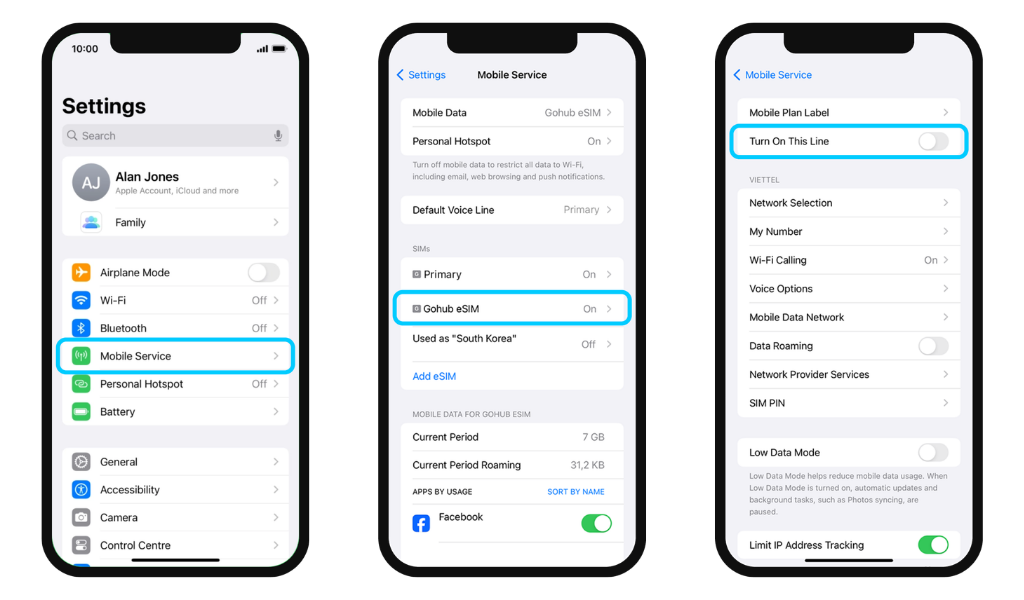
iOS
- Go to Settings → Mobile Service
- Select the eSIM you want to disable
- Toggle off Turn On This Line
Android
- Go to Settings → Connections
- Tap SIM Manager
- Select the eSIM you want to disable
- Toggle it off
Important: Turning off your Gohub eSIM does not pause its validity period. Your plan will continue counting down toward its expiry date even while the line is disabled.
When you're ready to use it again, simply follow the same steps and toggle the line back on.