

WhatsApp 24/7:+1 (302) 899-2888
Help and contact
Gohub Logo – Travel eSIM Provider
HomeAbout UsBuy eSIM
Login
Loading page, please wait...
Gohub Logo – Travel eSIM Provider
Download Gohub App on the App StoreApp StoreDownload Gohub App on the Google PlayGoogle Play

Popular Destinations

ThailandChinaVietnamJapanSouth KoreaTaiwanSingaporeMalaysia

Gohub

About UsCareersPartner with us

eSIM

How to install eSIMSupported DevicesData UsageCarrierEsim Travel GuideEsim News

Help

Help CenterUsing your eSIMTroubleshootingCompatible devicesFAQ

Follow Us

FacebookLinkedInInstagramTikTok
© 2026 Gohub. All rights reserved.
Privacy PolicyTerms of Service
Buying your Gohub eSIM
  1. Help center
  2. /Buying your Gohub eSIM
  3. /How do I place an order on the Gohub website?

How do I place an order on the Gohub website?

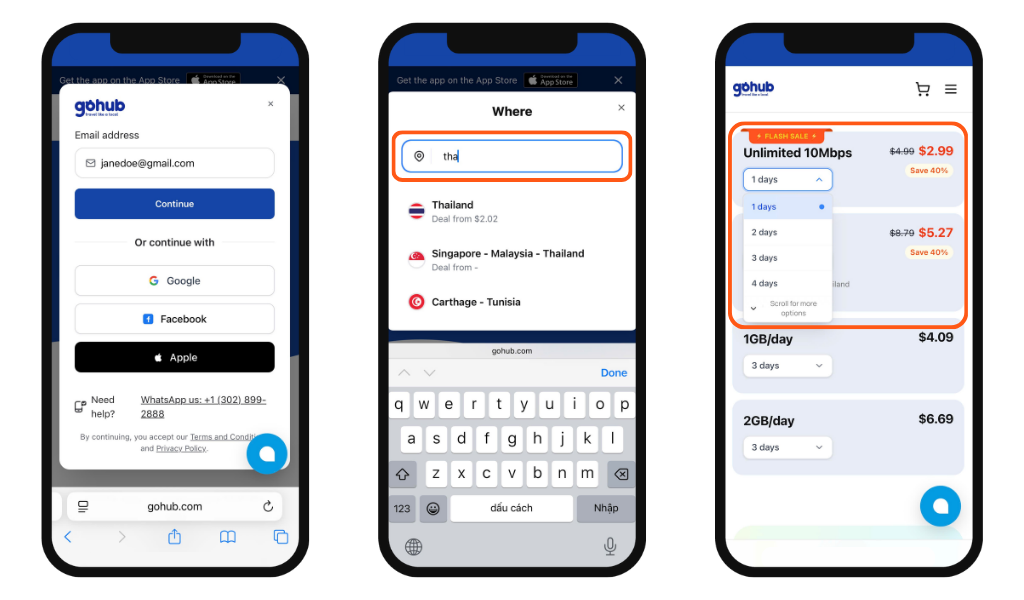
1. Sign in

Sign in to your Gohub account or you'll be prompted to log in when you reach checkout.

2. Search for your destination

Using the search bar, or browse by Popular Destinations, Single Country, or Multi-Country plans.

3. Select a plan

Read through the plan details carefully, including data amount, validity, network speed, and any notes such as KYC requirements.
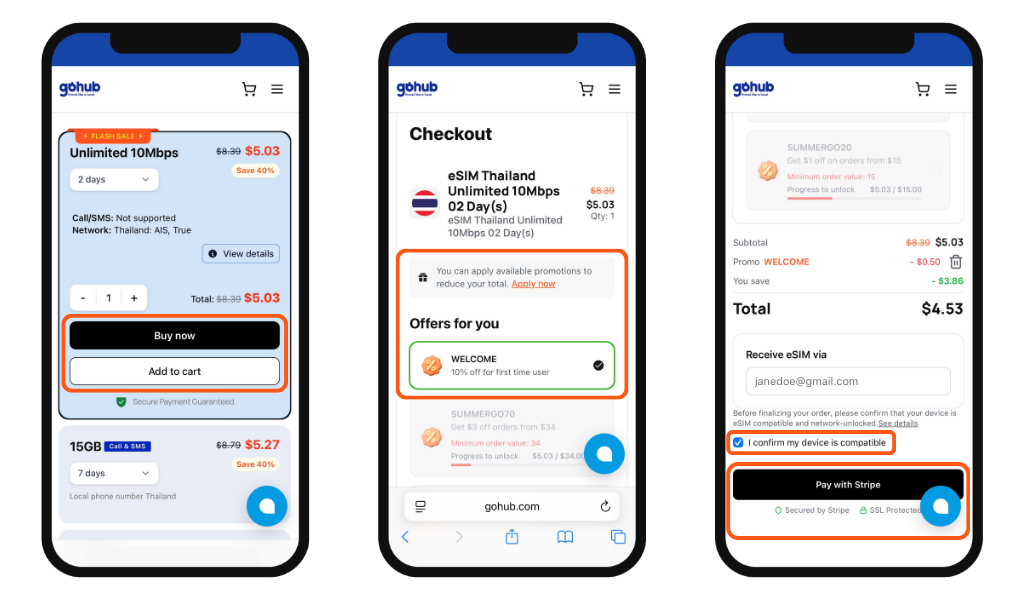
4. Add to cart or buy now
  • Tap "Add to Cart" to continue browsing and purchase multiple plans at once
  • Tap "Buy Now" to go directly to checkout
5. Apply a promo code

At checkout, enter any promo code in the designated field, or select from available coupons displayed on the page.

6. Confirm device compatibility

Check the box confirming your device is eSIM-compatible and network-unlocked before proceeding.

7. Complete payment

Tap "Pay with Stripe" to finish your purchase securely.

Once payment is confirmed, your eSIM details will be sent to your registered email address.
Related guides

  • Do I need an account to buy an eSIM on Gohub?
  • How do I create a Gohub account?
  • Should I buy my eSIM on the Gohub app or website?
  • How do I find the right eSIM plan for my destination?
  • What information do I need before choosing a plan?
  • How do I place an order on the Gohub app?
  • How do I apply a promo code on the Gohub website?
  • How do I apply a promo code on the Gohub App?