

WhatsApp 24/7:+1 (302) 899-2888
Help and contact
Gohub Logo – Travel eSIM Provider
HomeAbout UsBuy eSIM
Login
Loading page, please wait...
Gohub Logo – Travel eSIM Provider
Download Gohub App on the App StoreApp StoreDownload Gohub App on the Google PlayGoogle Play

Popular Destinations

ThailandChinaVietnamJapanSouth KoreaTaiwanSingaporeMalaysia

Gohub

About UsCareersPartner with us

eSIM

How to install eSIMSupported DevicesData UsageCarrierEsim Travel GuideEsim News

Help

Help CenterUsing your eSIMTroubleshootingCompatible devicesFAQ

Follow Us

FacebookLinkedInInstagramTikTok
© 2026 Gohub. All rights reserved.
Privacy PolicyTerms of Service
Buying your Gohub eSIM
  1. Help center
  2. /Buying your Gohub eSIM
  3. /How do I apply a promo code on the Gohub website?

How do I apply a promo code on the Gohub website?

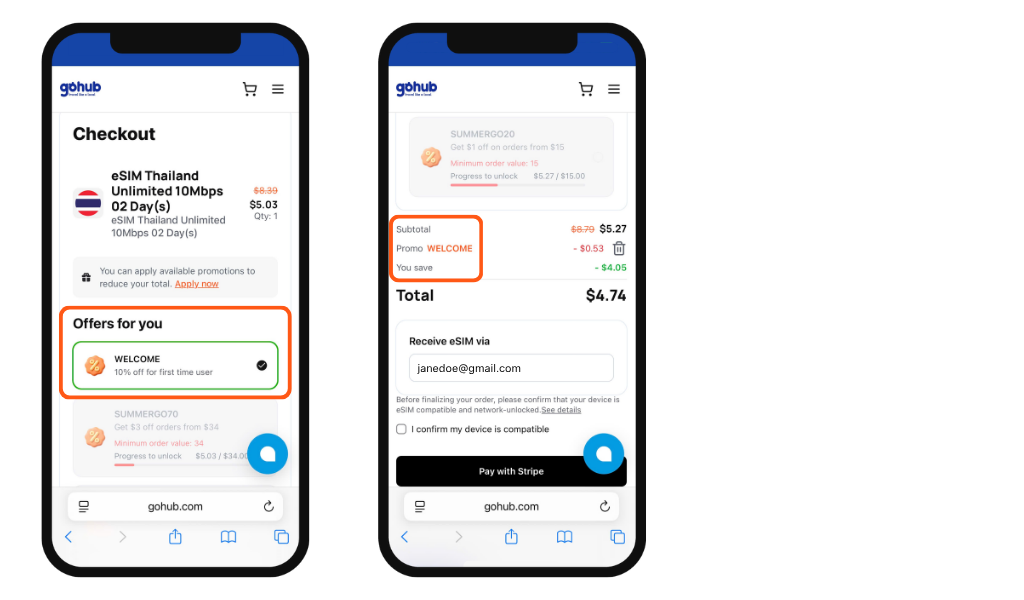
On the checkout page, you'll see an "Offers for you" section with two ways to apply a discount:

Option 1: Select an available coupon

Browse the list of coupons displayed on the page. Coupons you're eligible for are highlighted in green with a checkmark, simply tap one to apply it instantly.
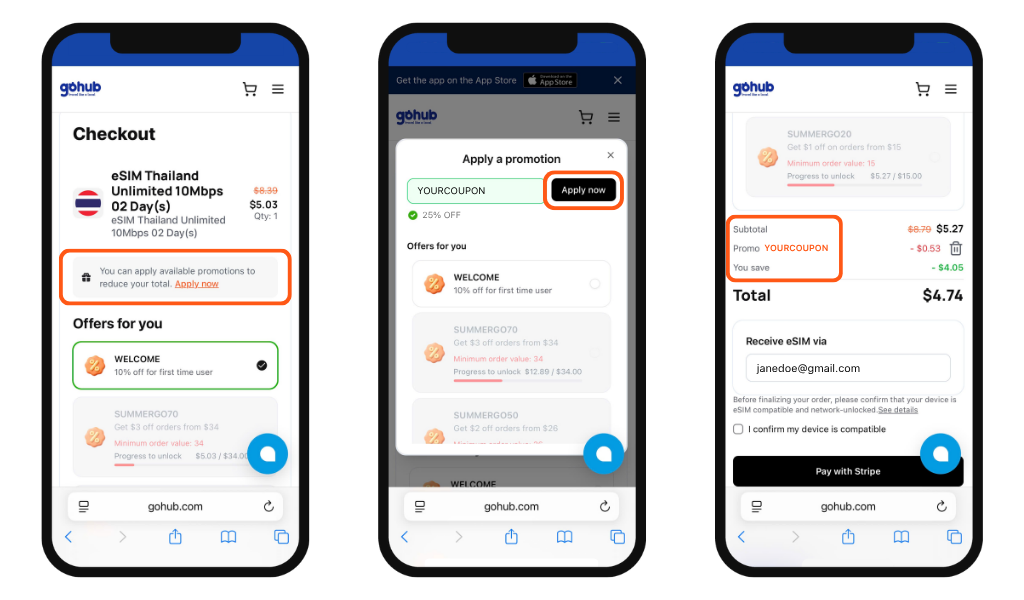
Option 2: Enter a code manually

Have an exclusive or private code from Gohub? Tap "Apply now" at the top of the page → Type your code into the field → Tap "Apply now" to redeem it.
Seeing a red message?

There are two common reasons a code may not apply:

  • Your order total hasn't reached the minimum spend required for that coupon
  • The code cannot be used on plans that are already on sale. Check the coupon's conditions and try again, or contact Gohub support if you need help.

Tip: Some codes are order-value based - the more you buy, the bigger the discount unlocked.

Related guides

  • Do I need an account to buy an eSIM on Gohub?
  • How do I create a Gohub account?
  • Should I buy my eSIM on the Gohub app or website?
  • How do I find the right eSIM plan for my destination?
  • What information do I need before choosing a plan?
  • How do I place an order on the Gohub website?
  • How do I place an order on the Gohub app?
  • How do I apply a promo code on the Gohub App?