

WhatsApp 24/7:+1 (302) 899-2888
Help and contact
Gohub Logo – Travel eSIM Provider
HomeAbout UsBuy eSIM
Login
Loading page, please wait...
Gohub Logo – Travel eSIM Provider
Download Gohub App on the App StoreApp StoreDownload Gohub App on the Google PlayGoogle Play

Popular Destinations

ThailandChinaVietnamJapanSouth KoreaTaiwanSingaporeMalaysia

Gohub

About UsCareersPartner with us

eSIM

How to install eSIMSupported DevicesData UsageCarrierEsim Travel GuideEsim News

Help

Help CenterUsing your eSIMTroubleshootingCompatible devicesFAQ

Follow Us

FacebookLinkedInInstagramTikTok
© 2026 Gohub. All rights reserved.
Privacy PolicyTerms of Service
Buying your Gohub eSIM
  1. Help center
  2. /Buying your Gohub eSIM
  3. /How do I create a Gohub account?

How do I create a Gohub account?

Creating a Gohub account is automatic, there's no separate sign-up process. Simply choose how you'd like to sign in, and your account is created instantly on your first login.

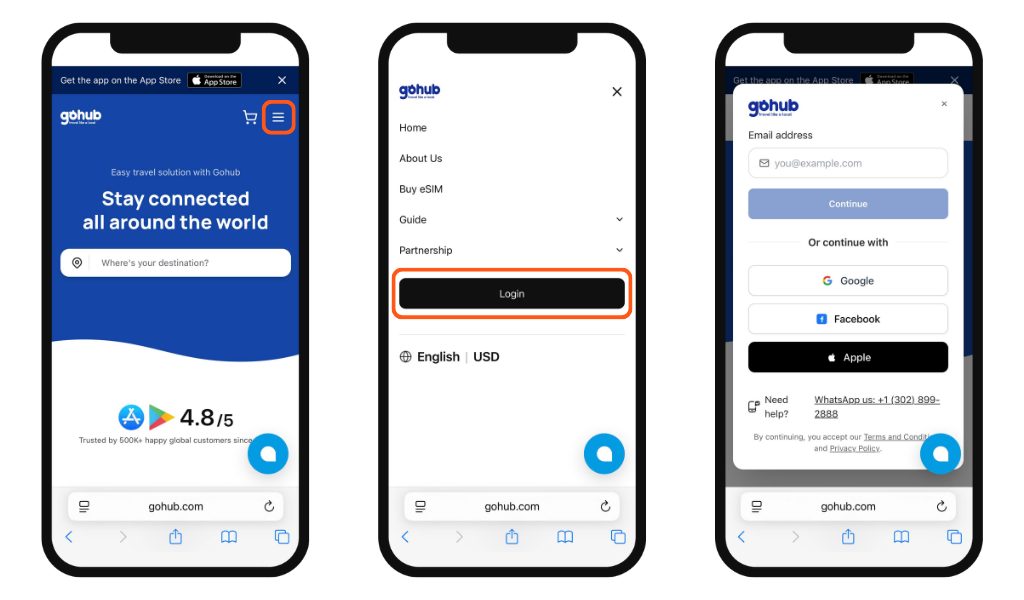
On the website

Go to gohub.com and click the Login button. Then choose how you'd like to continue:

  • Email - enter your email address and follow the verification link sent to your inbox
  • Google, Facebook, or Apple ID - click the corresponding button and you're in
On the App

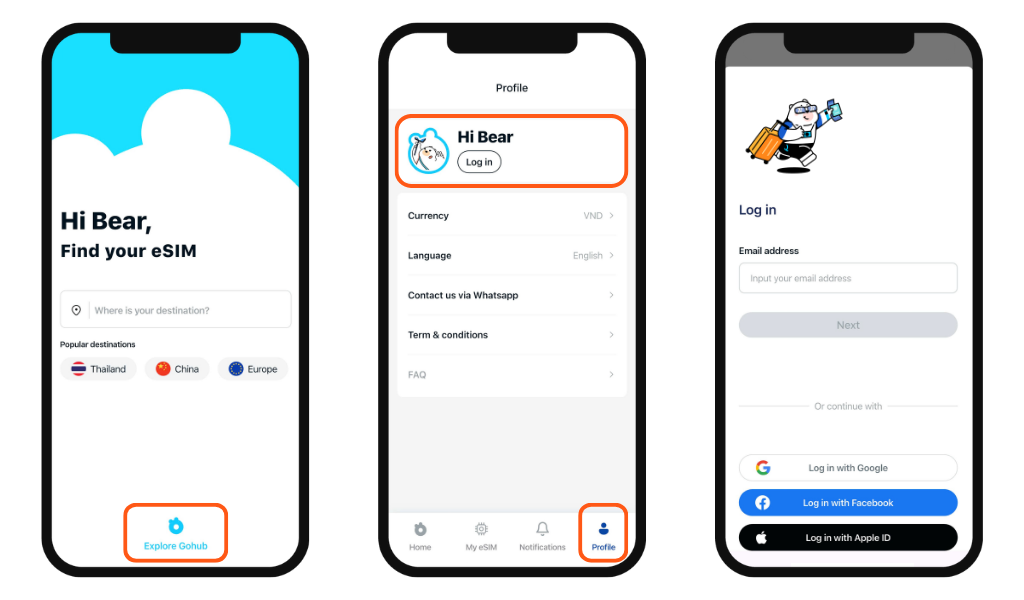
From the app's home screen, tap Explore Gohub → go to the Profile section → tap Login. Then sign in using the same options: email, Google, Facebook, or Apple ID.
Related guides

  • Do I need an account to buy an eSIM on Gohub?
  • Should I buy my eSIM on the Gohub app or website?
  • How do I find the right eSIM plan for my destination?
  • What information do I need before choosing a plan?
  • How do I place an order on the Gohub website?
  • How do I place an order on the Gohub app?
  • How do I apply a promo code on the Gohub website?
  • How do I apply a promo code on the Gohub App?