

How to Use TikTok in China with a Gohub eSIM

How to Use TikTok in China with a Gohub eSIM
Learn how to disable TikTok’s location access and prepare your phone before traveling to China so you can use TikTok with a Gohub China eSIM.
For China eSIM plans labeled “100% TikTok” on the Gohub website, Gohub guarantees TikTok access throughout your stay in China.
To qualify for this guarantee and minimize potential issues, please complete all the steps below before and during your trip.
Important: Install your eSIM and configure your TikTok settings while you are still in Vietnam, following the instructions below.
Step 1: Install Your eSIM Before Leaving Vietnam
Install the eSIM on your device before departing for China.
After installation:
Keep the eSIM installed on your device.
Do not delete the eSIM after installing it.
Do not wait until you arrive in China to install the eSIM.
Step 2: Disable TikTok’s Location Access Before Traveling to China
This step is mandatory.
Before departure, check your phone’s settings and disable location access for TikTok.
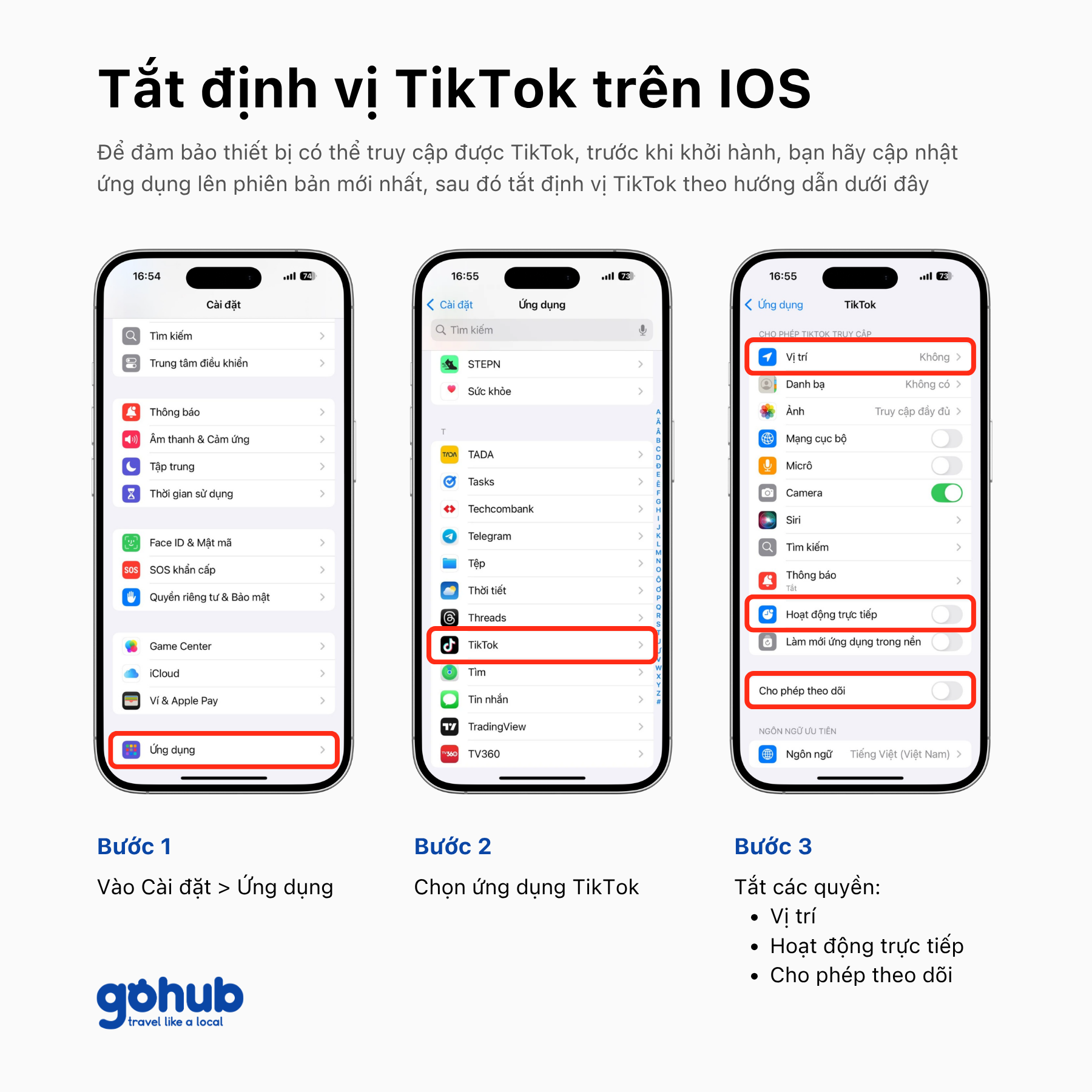
On iPhone
Go to Settings → Apps → TikTok, then disable Location Access, Live Activities, and Allow Tracking, as shown in the guide below.
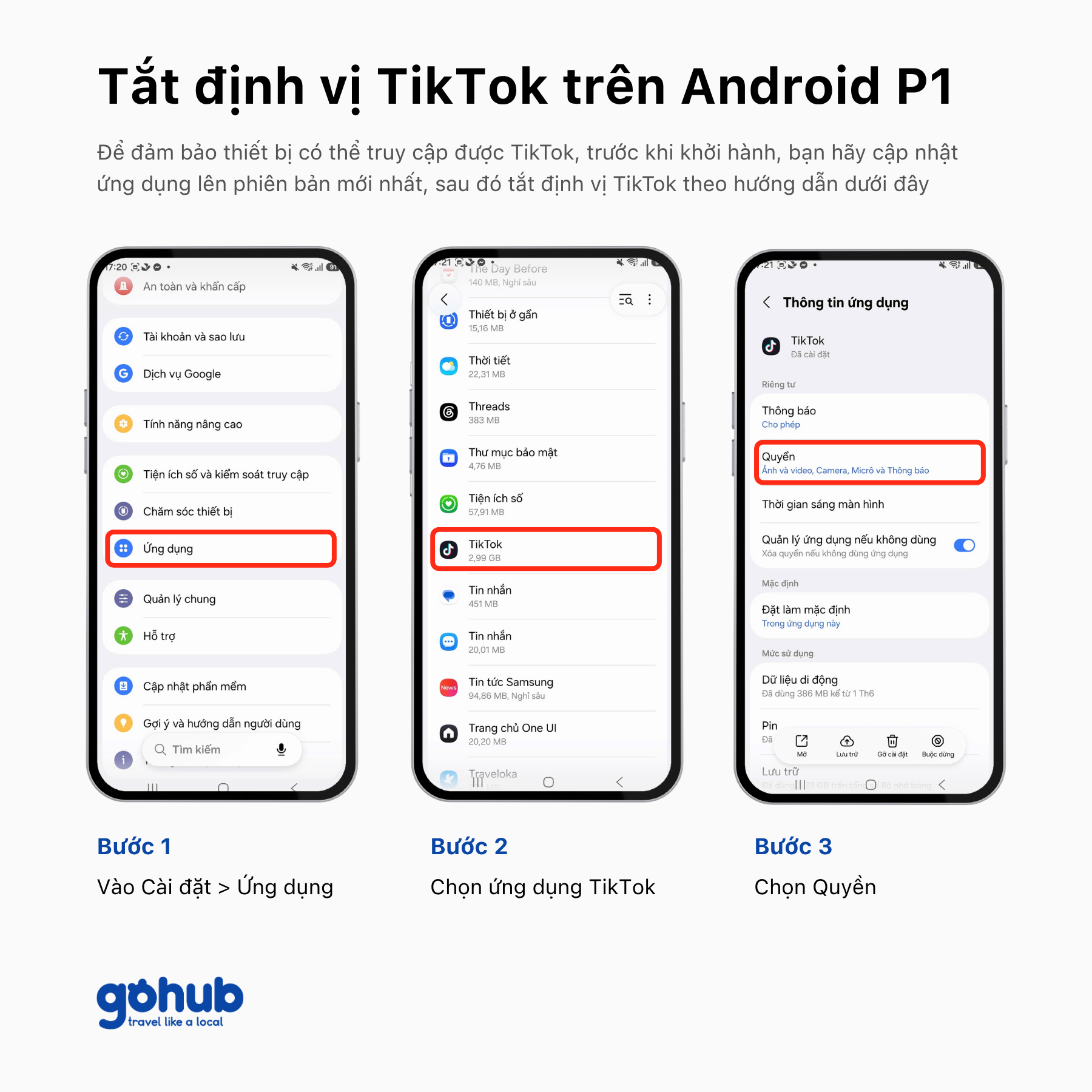
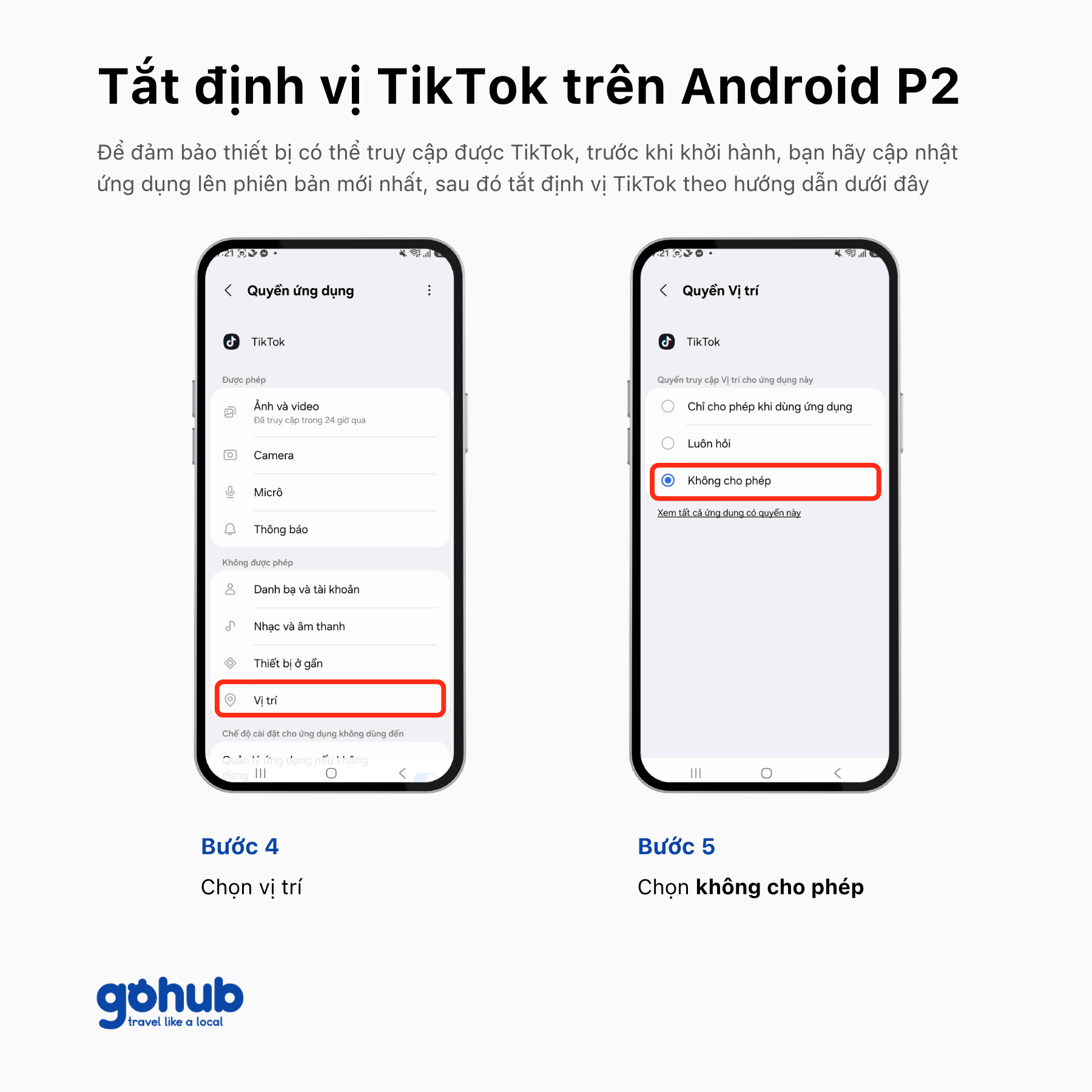
On Android
Menu names may vary depending on your device. In most cases, you can follow the five steps shown below.
Step 3: Use Your Gohub eSIM’s Mobile Data to Access TikTok in China
Once you arrive in China, follow these requirements when using TikTok:
Use mobile data from your Gohub eSIM.
Do not switch to hotel, airport, café, or public Wi-Fi.
Make sure your phone is using the Gohub eSIM for mobile data.
Accessing TikTok through Wi-Fi in China may reveal your device’s location or connection information and affect your ability to access TikTok afterward.
Pre-Departure Checklist
Before traveling to China, make sure you have completed all three mandatory requirements:
☐ Installed your Gohub eSIM while still in Vietnam.
☐ Disabled TikTok’s location access.
☐ Understood that you must not use Wi-Fi in China to access TikTok.
Please complete all the instructions above before departure.
Gohub’s TikTok Access Guarantee
Gohub guarantees 100% TikTok access for eSIM products labeled “100% TikTok” on the Gohub website, provided that you have followed all the precautions described above.
If you have:
Installed your eSIM in Vietnam;
Disabled TikTok’s location access before traveling to China;
Avoided using Wi-Fi in China to access TikTok; and
Used the correct eSIM product labeled “100% TikTok”;
but China’s network security systems still identify your device’s location and block TikTok access, Gohub will offer a replacement or refund in accordance with the policy applicable to your product.
Important Notes
This guarantee applies only to eSIM products labeled “100% TikTok” by Gohub.
Your ability to access TikTok may be affected if you:
Do not disable TikTok’s location access before your trip;
Use Wi-Fi in China;
Change location-related settings during use;
Do not select your Gohub eSIM for mobile data; or
Do not complete all the required steps before arriving in China.
Please complete these steps before departure to help ensure reliable TikTok access throughout your trip.
Explore Gohub China eSIM plans with the “100% TikTok” guarantee here.

Hi! Chúng mình là Gohub Team Gohub là nhà bán eSIM du lịch hàng đầu Việt Nam và là người bạn đồng hành đáng tin cậy của hàng triệu du khách trong mỗi chuyến đi. Với niềm yêu thích du lịch và công nghệ, team luôn mong muốn mang đến cho bạn những hành trình mượt mà nhất. Chúng mình chia sẻ nhiều mẹo du lịch thực tế, kinh nghiệm được rút ra từ những chuyến đi khắp châu Á đến châu Âu và giới thiệu các giải pháp eSIM tiện lợi để bạn luôn kết nối mọi lúc mọi nơi. Mục tiêu của Gohub Team là giúp bạn tự tin chuẩn bị, thoải mái khám phá và tận hưởng từng khoảnh khắc trong chuyến đi của mình.
View all articles →Related articles
eSIM at Abu Dhabi Airport (AUH): Setup, Cost & Best Plans 2026
Zayed International Airport now hands out a free 10GB SIM for 24 hours. How it works, where it falls short, and when a UAE eSIM plan is still worth it.
Best eSIM for Vietnam in 2026: 8 Options Compared
Which eSIM is best for Vietnam in 2026? Compare Gohub, Airalo, Holafly, Nomad, Ubigi and local SIMs on price, data, coverage and registration.
Best eSIM for USA Travel in 2026: 5 Providers Compared
Which eSIM is best for the USA in 2026? We compare Gohub, Airalo, Holafly, Nomad and Ubigi on price, network, hotspot and US numbers, plus setup steps.
Internet in Vietnam for Tourists: The Complete 2026 Guide
Compare eSIM, SIM cards, and WiFi options for Vietnam. See which carrier holds up in Sapa and the Mekong Delta, data needs, and setup tips for 2026.
Internet in South Korea for Tourists: The Complete 2026 Guide
Heading to Korea? Compare eSIM, tourist SIM cards, and pocket WiFi rental, plus why KTX and Seoul's subway have some of the fastest connections anywhere
Internet in Thailand for Tourists: The Complete 2026 Guide
Planning a Thailand trip? Compare eSIM vs tourist SIM, AIS vs True vs dtac, and island-by-island coverage to pick the right way to stay connected