

How to Get Gohub Free eSIM Trial (300MB/1 Day for Asia)

You land in a new country, turn off airplane mode, and nothing loads. No maps, no ride apps, no way to message your hotel. You connect to airport WiFi and search for a quick solution. That is when you come across the gohub free eSIM trial.
Free data sounds convenient, especially right after arrival. However, most travelers are not sure how it works, when to activate it, or how long it actually lasts.
This matters more than ever. The GSMA estimates that over 1 billion devices now support eSIM, and adoption is growing quickly among international travelers. At the same time, many providers have introduced free eSIM trials with small data packages to help users get started without paying upfront.
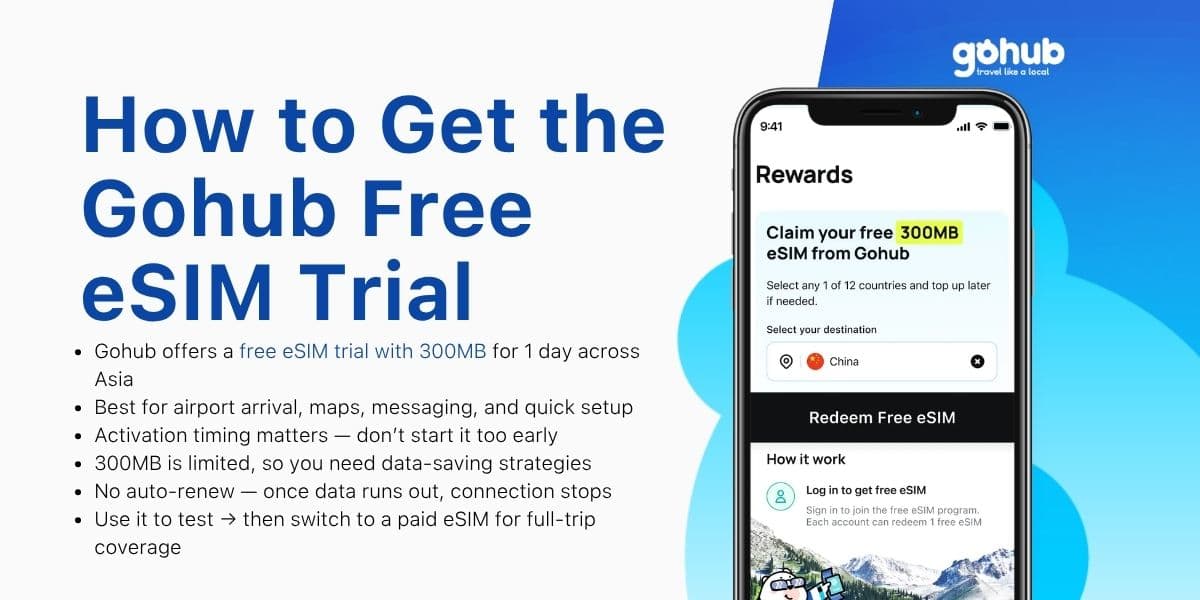
The Gohub free eSIM trial (300MB for 1 day) is built for that exact situation. It gives you just enough data to get online, check directions, and move from the airport to your destination.
In this guide, you will learn how to claim the trial, activate it at the right time, and use your data carefully so it lasts when you need it most.
TL;DR
Gohub offers a free eSIM trial with 300MB for 1 day in Asia
Best for arrival tasks like maps, messaging, and ride booking
Activate it at the right time to avoid losing hours
300MB is limited, so manage data usage carefully
No auto-renew. Data stops once it runs out
Use it to start, then switch to a paid eSIM for full coverage
What You Get With the Gohub Free eSIM Trial
Before you install anything, it’s important to know exactly what the gohub free eSIM trial includes and what it is meant to do.
Key features of the trial
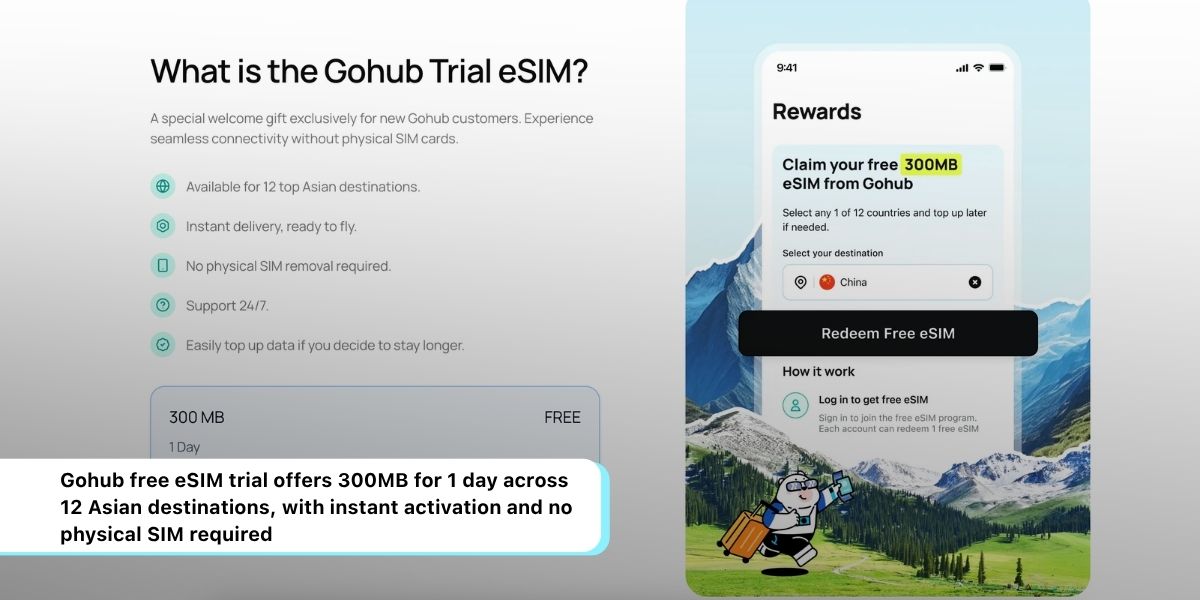
The trial is simple and focused:
300MB of mobile data
Valid for 1 day
Delivered via eSIM (no physical SIM needed)
Instant activation once configured
In other words, this is not a full travel plan. Instead, it is a starter connection designed to get you online quickly.
Supported countries (Asia)
The gohub free eSIM trial is available across 12 popular destinations in Asia:
Coverage depends on local carrier partners, so performance may vary slightly by location. However, in major cities and airports, connectivity is typically stable.
What this trial is designed for
This trial works best in specific situations:
right after landing at the airport
testing network speed before buying a plan
using maps, messaging, or booking a ride
Therefore, you should treat it as a temporary solution, not your main source of data for the entire trip.
Requirements Before You Claim the Trial
Before you proceed, you need to make sure your device and setup meet a few basic conditions.
Device compatibility (eSIM support)
First, your phone must support eSIM technology. Most modern devices do, including:
iPhone XS and newer
Google Pixel 3 and newer
Samsung Galaxy S20 and newer
If your device does not support eSIM, the trial will not work.
Unlocked phone requirement
Next, check whether your phone is unlocked.
If your device is locked to a specific carrier, it may block external eSIM profiles. This is one of the most common reasons why travelers cannot activate a free eSIM.
Internet needed for setup
You will also need a stable internet connection to install the eSIM.
In most cases, travelers use:
airport WiFi
hotel WiFi
Without this step, the installation cannot be completed.
Eligibility conditions
Depending on the offer, the free eSIM trial may be limited to:
first-time users
one activation per device
This helps prevent repeated use of the same trial.
How to Get the Gohub Free eSIM Trial (Step-by-Step)
Once your device is ready, you can move on to the installation process. Following the steps carefully will help you avoid common mistakes.
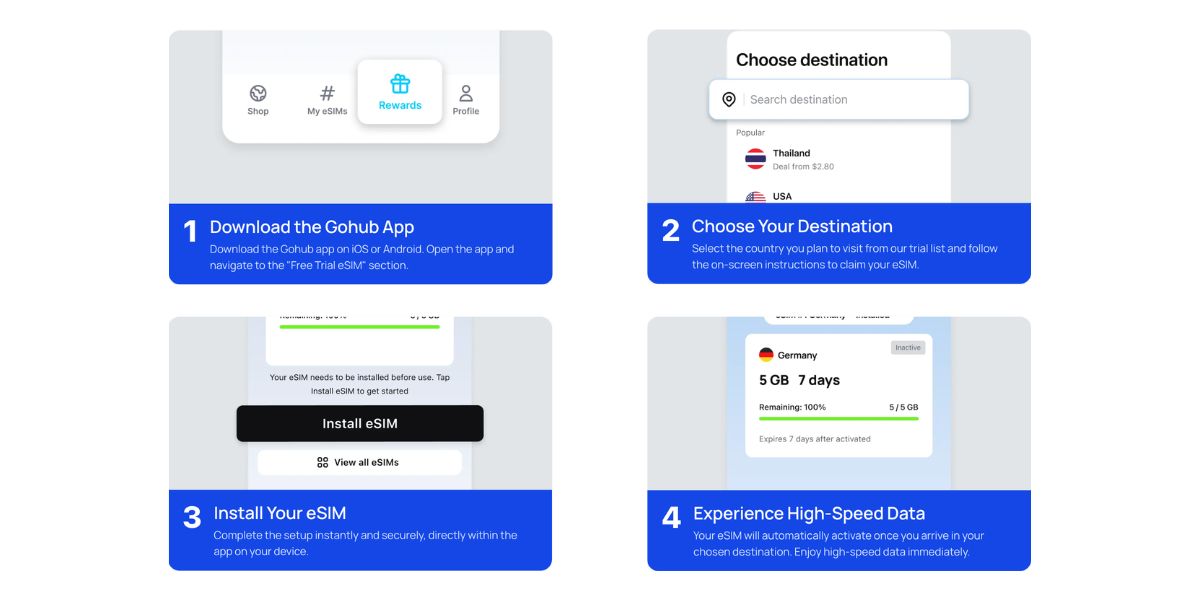
Step 1 — Access the free eSIM offer
Start by visiting the official Gohub page or campaign link where the trial is offered.
From there, you will receive:
a QR code
or instructions to install via app
Make sure you are using the official source to avoid errors.
Step 2 — Install the eSIM (QR or app)
Next, install the eSIM on your phone.
You can:
scan the QR code
or follow in-app installation steps
During this stage, ensure:
you are connected to WiFi
you complete all setup prompts
Step 3 — Choose when to activate
This step is critical.
Some users install the eSIM too early and lose valuable usage time. Depending on the setup, the 1-day validity may start:
when the eSIM is activated
or when it first connects to a network
For that reason, it is best to:
install before your trip
activate only when you need it
Step 4 — Set eSIM as your data line
After installation, go to your mobile settings and:
select the eSIM as your data line
keep your main SIM active if needed
This allows you to:
use data from the eSIM
still receive calls or OTP messages on your primary number
Step 5 — Turn on data roaming
Even though it may seem counterintuitive, this step is required.
Make sure:
data roaming is ON for the eSIM
data roaming is OFF for your home SIM
Otherwise, you may see signal bars but have no internet.
Step 6 — Confirm your connection
Finally, test your connection by:
opening a map
searching on Google
sending a message
If everything works, your gohub free eSIM trial is ready to use.
How to Make 300MB Last (Data Budgeting Strategy)
Now that your connection is active, the next challenge is managing your limited data efficiently.
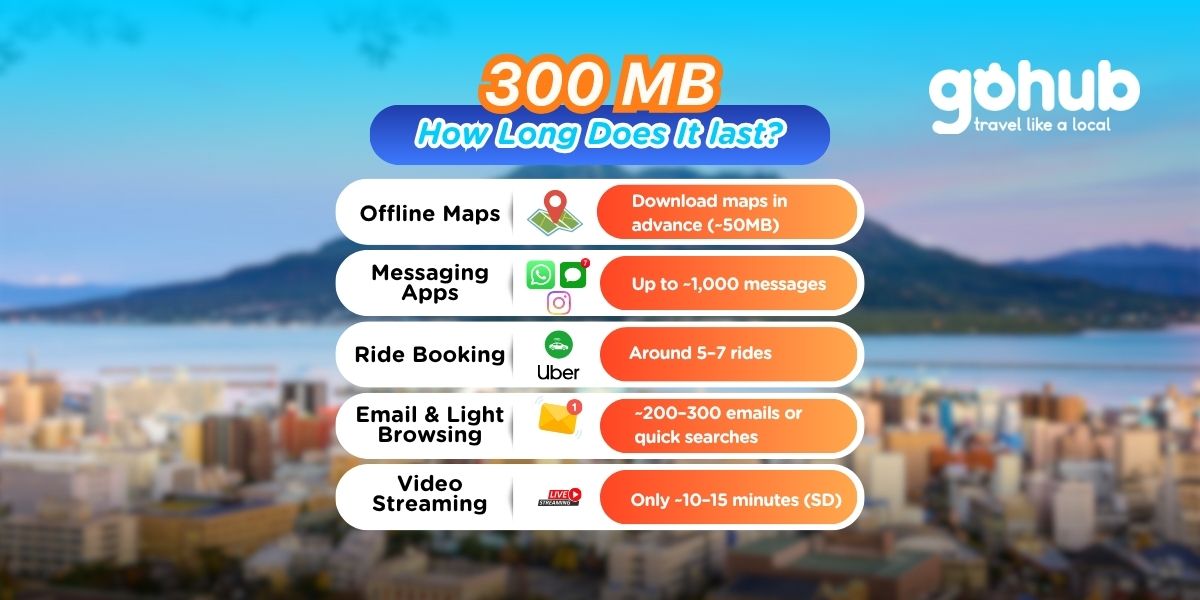
Estimate what 300MB can cover
To use your data wisely, it helps to understand consumption:
Google Maps navigation: low usage
Messaging apps: very low
Web browsing: moderate
Video streaming: very high
As a result, your usage choices will directly affect how long the trial lasts.
Download essentials in advance
Before using your data, prepare offline resources:
download maps for your destination
save hotel and key locations
install translation packs
This reduces real-time data consumption.
Turn off background data usage
Many apps consume data without you noticing. To prevent this:
disable auto updates
turn off cloud sync
restrict background activity
This step alone can save a significant portion of your 300MB.
Avoid high-data activities
To extend your usage time, avoid:
streaming videos
scrolling social media feeds
downloading large files
Instead, focus on essential tasks.
Use data-efficient apps
Whenever possible, use:
messaging instead of calls
lightweight versions of apps
text-based navigation
This helps you stay connected longer.
Quick Troubleshooting Guide
Even with correct setup, issues can happen. Fortunately, most problems are easy to fix.
eSIM shows signal but no internet
If you have signal but cannot connect:
turn airplane mode ON and OFF
restart your phone
reselect the eSIM as data line
No signal at all
If there is no signal:
confirm your destination is supported
check if activation was completed
ensure the eSIM is enabled
Data not working
If data is not loading:
turn on data roaming
check APN settings if required
eSIM not installing
If installation fails:
reconnect to WiFi
rescan the QR code
retry installation
In most cases, these steps solve the issue within minutes.
What Happens When the Trial Ends?
Before relying on the trial, you should understand how it ends.
Data runs out
Once you reach the 300MB limit:
your connection stops immediately
there is no reduced-speed fallback
No auto-renew
The gohub free eSIM trial does not renew automatically.
You will not be charged, but you also will not receive additional data.
Validity expiration
Even if you do not use all data, the plan expires after 1 day.
Therefore, timing your activation is important.
When Should You Upgrade to a Paid eSIM?
After using the trial, most travelers reach a decision point.
Signs you need more data
You should upgrade if:
your data runs out quickly
you need stable connectivity
your trip lasts more than a day
Benefits of switching to a paid plan
A paid travel eSIM offers:
more data
longer validity
more consistent performance
Choosing the right plan
To select the best option, consider:
your destination
your trip duration
your data usage habits
Best Setup Flow for Travelers
To make the most of your experience, it helps to follow a simple strategy.
Recommended flow
Install the eSIM before your trip
Activate it upon arrival
Use the free trial for initial setup
Upgrade if needed
Why this approach works
This method:
prevents downtime
avoids early activation
ensures smoother travel experience
FAQs
What is the Gohub free eSIM trial?
The gohub free eSIM trial is a promotional data plan that gives you 300MB of mobile data for 1 day across selected Asian countries. It is designed to help travelers get online quickly after arrival or test the network before buying a full plan.
How do I get the Gohub free eSIM trial?
You can claim the trial through Gohub’s official page, then install it by:
scanning a QR code
or following in-app setup instructions
👉 Start here: https://gohub.com/esim
When does the 1-day validity start?
In most cases, the validity starts when:
the eSIM is activated
or when it first connects to a network
For that reason, it’s best to activate your free eSIM trial only when you actually need it.
Can I install the eSIM before my trip?
Yes, and this is recommended.
You can install it in advance using WiFi. Then, activate it after landing to avoid wasting your 1-day usage window.
Does my phone need to support eSIM?
Yes. Your phone must support eSIM to use the trial.
Most compatible devices include:
iPhone XS or newer
Google Pixel 3 or newer
Samsung Galaxy S20 or newer
👉 Check full list: https://gohub.com/blog/esim-compatible-devices
Does my phone need to be unlocked?
Yes. If your phone is locked to a carrier, it may block the installation of an external eSIM.
What can I do with 300MB of data?
300MB is enough for light usage, such as:
Google Maps navigation
messaging apps (WhatsApp, Telegram, iMessage)
booking rides (Grab, Uber)
checking emails
However, it is not enough for:
video streaming
heavy social media usage
Can I use hotspot with the free eSIM trial?
This depends on the network and device. Even if hotspot is available, 300MB will run out quickly when shared across devices.
What happens when I run out of data?
Once you reach the 300MB limit:
your internet connection stops immediately
there is no auto top-up or additional free data
You will need to purchase a paid plan to continue using mobile data.
Will the free eSIM renew automatically?
No. The gohub free eSIM trial does not auto-renew.
It expires after:
1 day
or when the data limit is reached
There are no hidden charges.
Can I use my main SIM and eSIM at the same time?
Yes. Most smartphones support dual SIM functionality.
This allows you to:
keep your main SIM active for calls or OTPs
use the eSIM for data
👉 Setup guide:https://gohub.com/how-to-install-esim
Is the Gohub free eSIM trial enough for a full trip?
No. The trial is designed for:
short-term use
arrival connectivity
testing
For full-trip coverage, you should switch to a paid plan.
Final Thoughts
The gohub free eSIM trial is a practical tool for modern travelers.
It helps you:
get online quickly
test your setup
avoid immediate costs
However, it is not designed for long-term use. Instead, it works best as a starting point.
If you use it strategically, 300MB is enough to get you through arrival and into your first destination without stress.
Start with the gohub free eSIM trial to get connected right away.
Then, when you need more data, explore a full travel eSIM plan that matches your trip and keeps you connected without interruption.
👉 https://gohub.com/blog/free-esim-explained
Citation & Sources
To ensure accuracy and trustworthiness, this guide is based on official documentation from device manufacturers, telecom standards bodies, and eSIM providers:
GSMA — eSIM ecosystem & adoption insights
https://www.gsma.com/esim/Apple — About eSIM on iPhone
https://support.apple.com/en-us/HT209044Google — Set up an eSIM on Pixel
https://support.google.com/pixelphone/answer/9449293Samsung — What is eSIM and how it works
https://www.samsung.com/global/galaxy/what-is/esim/

Hi! Mình là Lala Wren, một content creator yêu xê dịch và đam mê chia sẻ trải nghiệm thực tế cho cộng đồng Gohub. Trong nhiều năm qua, mình đã đặt chân đến Thái Lan, Hàn Quốc, Nhật Bản, Singapore, Malaysia, Bali và nhiều điểm đến thú vị khác trên khắp châu Á. Cùng mình tìm hiểu tất tần tật từ khâu chuẩn bị eSIM, Visa, lịch trình và địa điểm nổi bật cho chuyến đi sắp tới của bạn nhé!
Ver todos los artículos →