

12 Signs of a Free eSIM Scam and How to Protect Yourself (2026)

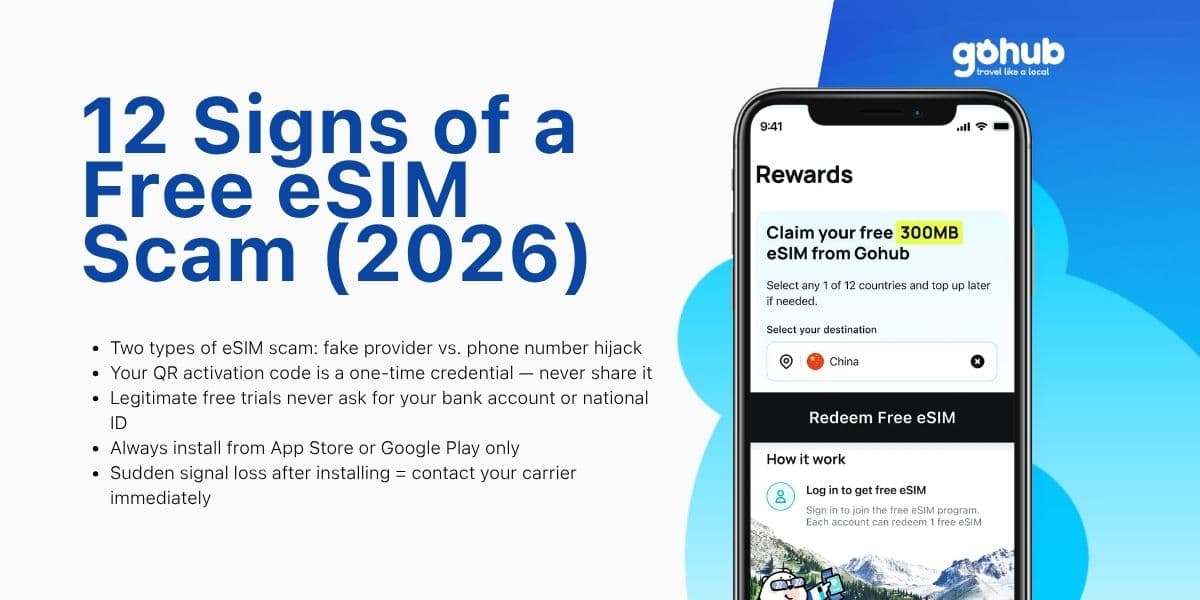
Free eSIM trials are genuinely useful — but they have also become fertile ground for scammers. India's Cyber Crime Coordination Centre (I4C) documented a sharp rise in eSIM-related fraud cases through 2024 and 2025, with victims losing money within minutes of a successful attack. In February 2026, moderators on r/eSIMs issued a formal warning about a coordinated campaign of newly created accounts pushing links to fraudulent eSIM providers. And in 2025, fake QR codes disguised as free eSIM activations were found physically attached to ATMs across Europe. As free eSIM advertising becomes more common, scammers are deliberately mimicking that language to target travelers and first-time users.
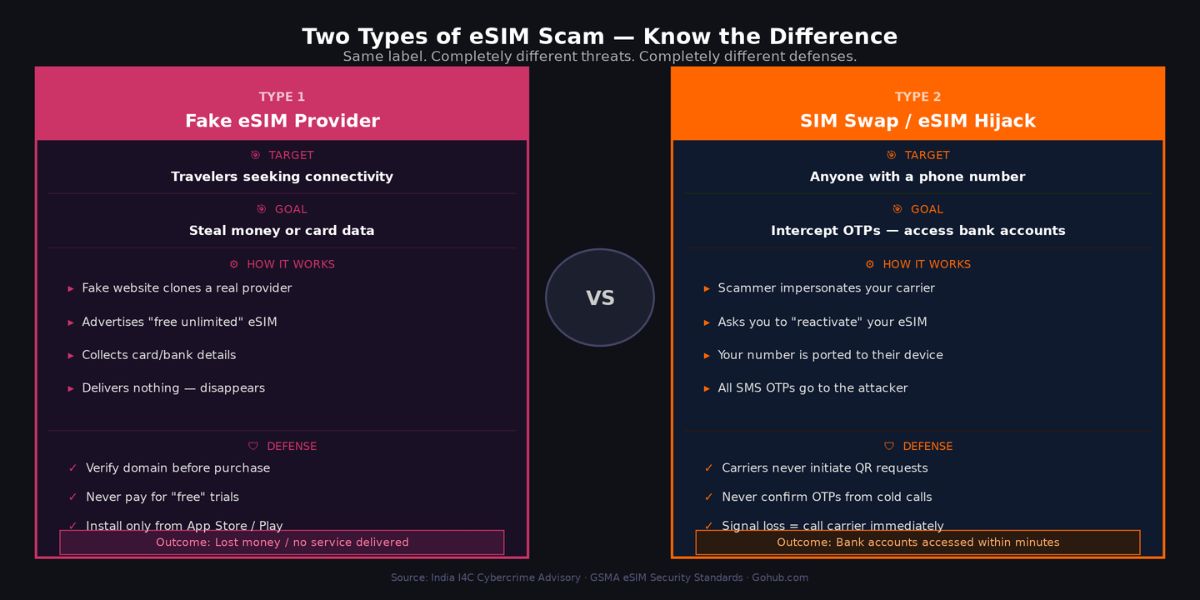
Before going further, one important myth needs addressing. The phrase "eSIM scam" actually covers two completely different threats that get conflated constantly. The first is a fake travel eSIM provider: a website or app that collects your money or card details, delivers no working service, and disappears. The second is an eSIM hijack or SIM swap attack: a social engineering scheme where a criminal transfers your real phone number to their device in order to intercept your banking OTPs and access financial accounts. Both are serious. Both are growing. But they require different defenses, and confusing them leads people to protect against the wrong threat. This article covers both clearly. The 12 warning signs below are organized into three stages — red flags before you buy, during the purchase process, and after installation — followed by what to do if you have already been targeted.
Last verified: March 2026
TL;DR
Two distinct eSIM scam types exist: fake provider (steals money or card data) and eSIM hijack (steals your phone number to intercept OTPs)
Your eSIM QR activation code is a single-use credential — per GSMA standards, never share it with anyone under any circumstances
Legitimate free trials never require a national ID, bank account number, or OTP to install
Always install eSIM apps from the official App Store or Google Play only — never sideload an APK from an external link
If your phone suddenly loses signal after interacting with an unknown "eSIM" source, contact your carrier immediately from a different device
Verified providers with transparent terms: Gohub free trial at gohub.com/claim-free-esim
The Golden Rule — Your eSIM QR Code Is a Password
Before working through the 12 signs, one technical principle from the GSMA underpins all of them and is worth understanding clearly.
An eSIM activation QR code contains two things: the address of a secure SM-DP+ provisioning server and a unique activation code tied to your specific device's EID (a 32-character hardware identifier). When you scan the code, your device authenticates with the server, downloads the carrier profile, and the activation code is immediately invalidated. It cannot be reused. This means sharing your QR code — by screenshot, photo, or display — is functionally equivalent to sharing a one-time password. Whoever scans it first claims the profile.
GSMA-compliant providers including IDEMIA, Circles.life (Singapore), and carriers operating under standard eUICC architecture all enforce this model. The rule is simple: scan your QR code in private, never send a screenshot to anyone, and never display it on screen in a public setting. Legitimate customer support from any reputable provider will never ask you to share it.
Sign #1 — The Domain Does Not Match the Brand Name
Typosquatting is among the most common tactics used to create fake eSIM storefronts. Fraudulent domains follow predictable patterns: substituting a zero for the letter "o", adding a hyphen and generic word like "-deals" or "-store", or using a country-code TLD that differs from the official site. A provider whose real domain is one name but whose emails link to a slightly different version is a significant red flag.
How to verify in 30 seconds: Type the brand name directly into Google rather than clicking any link. Compare the exact domain in the browser address bar against the domain in any email you received. Check the App Store or Google Play listing — the developer name must match the company name on the website. If any of these three do not align, stop and do not proceed.
Sign #2 — The QR Code Arrived Without You Requesting It
A legitimate eSIM QR code is generated only after you complete a purchase or explicit free trial registration. It flows from you initiating an action, not from a provider or unknown party initiating contact with you.
Any QR code received via unsolicited SMS, email, Telegram message, WhatsApp, or social media post should be treated as potentially malicious. The fake QR codes placed on ATMs across Europe in 2025 operated on exactly this logic: the code appeared helpful and free, but scanning it either installed a malicious profile or directed the device to a credential-harvesting page. The same principle applies digitally. If you did not request an eSIM and a QR code arrives anyway, do not scan it.
Sign #3 — "Free Unlimited" But Requires a Credit Card to Verify
Every legitimate free trial currently active in 2026 — Gohub, Nomad, SimLocal, Eskimo, GigSky's standard tier — requires no credit card for the base free tier. This is a deliberate design choice by reputable providers specifically to reduce friction and build trust.
When a provider advertises a free unlimited eSIM but asks for card details to "verify your identity" or "place a hold," two outcomes are likely: an unauthorized recurring charge after a short period, or card data harvesting with no service delivered at all. The verification framing is a standard conversion dark pattern. If a free offer requires payment information before you receive anything, close the tab.
Sign #4 — The App Is Not on the Official App Store or Google Play
Travel eSIM apps distributed outside the App Store or Google Play have bypassed the review processes Apple and Google use to screen for malicious code. Requests to download an APK directly from a website, or to enable "install from unknown sources" on Android, should be treated as an immediate disqualifier regardless of how professional the surrounding website appears.
Even within official stores, the check is not complete until you verify the developer name matches the company, the app has a meaningful number of reviews with realistic distribution (a mix of ratings, not only 5-star entries), and the developer's response to negative reviews is substantive rather than generic. An app uploaded within the past 30 days with no reviews and an unverifiable developer name carries the same risk as a sideloaded APK.
Sign #5 — The App Requests Permissions Unrelated to Data Connectivity
A travel eSIM app's legitimate function is to deliver a data profile to your device and manage your plan. That function requires no access to your SMS inbox, your contacts list, your call logs, continuous location tracking, or your microphone.
When an app requests these permissions, one of two things is true: the app is a domestic carrier app that also manages your phone number and call services (which is different from a travel data eSIM), or the app is collecting data it has no functional need for. Granting SMS access to an unknown app is particularly dangerous because it hands that app the ability to read every OTP and verification code sent to your number. Deny all permissions not directly related to data connectivity, and if the app refuses to function without them, uninstall it.
Sign #6 — The Provider Asks for More Personal Information Than the Service Requires
Installing a travel eSIM requires your email address, a name, and a payment method for paid plans. Nothing else is structurally necessary for the transaction.
Red flags include requests for passport or national ID scans outside of a formal eKYC process tied to a licensed domestic carrier, requests for bank account numbers, requests for social security or tax identification numbers, and "verification selfie" uploads with no clear regulatory context. Some countries do require identity verification for SIM registration by law — Singapore, Japan, and Indonesia among them — but this process is conducted through the carrier's official eKYC system with clear regulatory disclosure, not through an informal upload form on a travel eSIM website. If the information being requested feels disproportionate to the service being provided, it is.
Sign #7 — There Is No Clear Refund Policy or Terms of Service
A refund policy is not just a consumer protection mechanism — it is a signal of organizational legitimacy. Providers who intend to deliver what they advertise have no reason to hide their refund conditions. The policy should be findable from the homepage footer, state clear timeframes and conditions, and apply specifically to the product being sold.
Equally important is the Terms of Service page. It should be linked clearly, readable in plain language, specify data limits and validity periods accurately, and include the company's legal name and registered address. A site that has only a generic "all sales final" disclaimer, no Terms page, or Terms that contradict the marketing copy is a provider that does not expect to honor complaints.
Sign #8 — Reviews Are Uniformly Perfect or Follow an Obvious Pattern
In February 2026, r/eSIMs moderators documented and removed a coordinated campaign in which dozens of accounts — all created within 30 days of posting, all with minimal karma, all using similar phrasing — simultaneously pushed positive reviews for the same provider. This is not an isolated tactic. It is a known conversion manipulation strategy used by fraudulent eSIM operators to manufacture social proof.
When evaluating reviews, prioritize: account age on forums like Reddit or TrustPilot, whether the reviewer has any posting history outside of eSIM topics, whether negative reviews exist and how the provider responded to them, and whether the review language across multiple accounts feels templated. A legitimate provider accumulates reviews organically over time with a realistic distribution of sentiment. Search "[provider name] scam" and "[provider name] not working" before purchasing from any unfamiliar operator.
Sign #9 — Customer Support Is Unreachable Before You Buy
Testing support responsiveness before completing a purchase is one of the most effective pre-purchase verification steps available, and almost nobody does it. Send a simple question — "Does your trial work in Japan?" or "What happens when my data runs out?" — through the live chat or contact form before entering any payment details.
A legitimate provider responds within a few hours with a specific, accurate answer. Red flags include: generic auto-replies that do not address the question, no live chat or contact form visible on the site, email addresses that bounce, support pages that return a 404 error, or response times measured in days. If a provider cannot answer a basic question before your money is involved, it will not answer questions after.
Sign #10 — The Email Uses Urgency, Poor Grammar, or Mismatched Branding
Fake eSIM confirmation and activation emails follow a consistent pattern: artificial urgency ("Your eSIM expires in 2 hours — activate NOW"), grammatical errors that a native-language business would not produce, logos that appear pixelated or slightly different from the official brand, and critically, a sender domain that does not match the website domain.
That final point is the most reliable technical check. If an email claims to come from a provider but the sender address uses a different domain — even one character off — the email is not from the provider. Hover over any link in the email before clicking and verify the destination URL matches the official domain exactly. Legitimate eSIM providers send simple, calm transactional emails. They do not create countdown timers or threats around activation.
Sign #11 — Someone Claiming to Be Your Carrier Asks You to Reactivate Your eSIM
This sign marks the transition into the second type of eSIM scam: the hijack. The attack begins with an unsolicited call, SMS, or message from someone claiming to be a representative of your mobile carrier. The stated reason varies — your eSIM needs reactivation, there is an account security issue, your number is about to be suspended — but the request is always the same: scan a QR code, click a link, or confirm an OTP to "verify" your account.
What is actually happening is a SIM swap initiation. If you comply, your phone number is transferred to the attacker's device. Within minutes, every SMS-based OTP sent to your number — banking, email, social media — goes to them instead of you. Your phone shows no signal because your number is no longer attached to it. Carriers do not initiate eSIM reactivation requests through calls or messages. If you receive one, hang up, do not click any link, and call your carrier directly using the number on their official website.
Sign #12 — Your Phone Loses Signal Suddenly After Interacting With an Unknown eSIM Source
Sudden and complete loss of mobile signal — calls fail, SMS stops arriving, mobile data disconnects — with no obvious hardware reason is the most visible symptom that a SIM swap has already been completed against you. At this point, your number has been ported to another device and the attacker is actively receiving your communications.
The response window is extremely short. Use a different phone or Wi-Fi connection immediately to: call your carrier and request an emergency SIM lock on your number, log into banking apps and temporarily disable SMS-based two-factor authentication in favor of an authenticator app, change passwords on your primary email account, and contact your bank directly to flag potential unauthorized access. In India, report to I4C (cybercrime.gov.in). In Singapore, contact the Singapore Police Force (SPF) at police.gov.sg. Acting within the first 30 minutes significantly improves the outcome.
What to Do If You Have Already Been Targeted
If you recognize any of the signs above after a transaction or interaction has already occurred, these are the five immediate steps regardless of which type of scam applies:
Call your carrier from a different device — request an emergency lock on your SIM/number and ask them to flag your account for unauthorized eSIM transfer attempts
Disable SMS-based OTP on financial accounts — log in via Wi-Fi or laptop and switch to an authenticator app before the attacker can use intercepted codes
Change passwords on email and financial accounts — starting with the email address tied to your banking, as that is the master recovery point for most accounts
Contact your bank within 24 hours — most banks have chargeback and fraud dispute processes that are significantly easier to initiate within the first day
Report to your national cybercrime authority — India: cybercrime.gov.in (I4C); Singapore: police.gov.sg (SPF); Vietnam: Cục An ninh mạng, Bộ Công an
How to Verify Any eSIM Provider in Under 2 Minutes
Before purchasing from any provider you are not already familiar with, run through this five-point check:
Search the exact domain on Google — does the result match the brand name and show an established web presence?
Find the app on App Store or Google Play — does the developer name match the website? Are reviews organic?
Is there a refund policy and a Terms of Service page linked from the footer?
Send one support message and wait — does a real person respond with a specific answer?
Search "[brand name] scam" and "[brand name] not working" on Reddit and TrustPilot — what does unfiltered user experience look like?
Frequently Asked Questions
Is it safe to use a free eSIM trial?
Yes, when the provider is verifiable and the trial requires no credit card or sensitive personal information. Reputable providers like Gohub, Nomad, SimLocal, and GigSky operate transparent free tiers. The risk lies specifically with unverified providers discovered through ads, unsolicited messages, or third-party review sites with suspicious review patterns.
How do I know if an eSIM provider is legitimate?
Check that the domain matches the brand, the app exists on official stores under a matching developer name, a refund policy and Terms of Service are publicly available, and customer support responds to a basic question before purchase. Established providers have been independently reviewed on platforms like Reddit's r/eSIMs over time.
What happens if I scan a fake eSIM QR code?
Depending on the code's design, one of two things occurs: either the code leads to a credential-harvesting page disguised as an activation portal, or it attempts to install a malicious eSIM profile that routes your connectivity through an attacker-controlled server. In either case, the immediate response is to avoid entering any information and to check Settings > Cellular for any unfamiliar eSIM profiles, removing any that you did not intentionally install.
What is the difference between an eSIM scam and a SIM swap?
A fake eSIM provider scam targets travelers looking for connectivity — it delivers no service and collects money or card data. A SIM swap attack targets your existing phone number to intercept OTPs for financial account takeover. The first is a consumer fraud issue. The second is identity theft with potential for significant financial loss. Both use "eSIM" in their mechanics but are entirely different attacks requiring different responses.
Can someone steal my data through an eSIM?
An eSIM profile itself does not grant access to the data stored on your device. However, a malicious eSIM profile could route your mobile traffic through a monitored network, exposing unencrypted communications. The more significant risk is a SIM swap, which enables account takeover through intercepted OTPs rather than direct device data access.
What should I do if I paid a fake eSIM provider?
Contact your bank or card issuer immediately and initiate a chargeback or fraud dispute. Most card networks have buyer protection for digital goods that were not delivered. Acting within 24 hours significantly improves success rates. Also report the provider domain to Google Safe Browsing (safebrowsing.google.com/safebrowsing/report_badware) to help protect other users.
When you are ready to use a free eSIM trial from a provider with transparent terms, no unnecessary permissions, and Asia-focused coverage, Gohub's 300MB trial is available at gohub.com/claim-free-esim — no credit card required.
Related reading: Best Free eSIM Trials 2026 → | How to Install an eSIM: Step-by-Step →
Citations
India Cyber Crime Coordination Centre (I4C). eSIM fraud and SIM swap warnings.
Instagram / Security researcher. Free eSIM ATM Scam Across Europe — Don't Scan That QR Code. August 2025.
Quick Heal Technologies. eSIM Frauds: How Scammers Hijack Your Phone. February 2026.
Circles.life Singapore. Is eSIM Safe? Security Risks, Privacy and Precautions. December 2025.
ZIM Connections. eSIM Security Protocols: What You Need to Know. December 2025.
WirelessGate. How to Recognize Fake eSIM Confirmation Emails. January 2026.
WirelessGate. eSIM eUICC Security Checklist: Safe Storage of QR Codes and Activation Details.
Korea eSIM Standards / WirelessGate. QR Code vs App Activation Under GSMA Rules. January 2026.

Hi! Mình là Lala Wren, một content creator yêu xê dịch và đam mê chia sẻ trải nghiệm thực tế cho cộng đồng Gohub. Trong nhiều năm qua, mình đã đặt chân đến Thái Lan, Hàn Quốc, Nhật Bản, Singapore, Malaysia, Bali và nhiều điểm đến thú vị khác trên khắp châu Á. Cùng mình tìm hiểu tất tần tật từ khâu chuẩn bị eSIM, Visa, lịch trình và địa điểm nổi bật cho chuyến đi sắp tới của bạn nhé!
查看全部文章 →